
Fetch the complete documentation index at: https://docs.turso.tech/llms.txt Use this file to discover all available pages before exploring further.
Vector Similarity Search is built into Turso and libSQL Server as a native feature.
Turso and libSQL enable vector search capability without an extension.
- Create a table with one or more vector columns (e.g.
FLOAT32) - Provide vector values in binary format or convert text representation to
binary using the appropriate conversion function (e.g.
vector32(...)) - Calculate vector similarity between vectors in the table or from the query
itself using dedicated vector functions (e.g.
vector_distance_cos) - Create a special vector index to speed up nearest neighbors queries (use the
libsql_vector_idx(column)expression in theCREATE INDEXstatement to create vector index) - Query the index with the special
vector_top_k(idx_name, q_vector, k)table-valued function
LibSQL uses the native SQLite BLOB
storage class
for vector columns. To align with SQLite
affinity rules,
all type names have two alternatives: one that is easy to type and another with
a _BLOB suffix that is consistent with affinity rules.
The table below lists six vector types currently supported by LibSQL. Types are listed from more precise and storage-heavy to more compact but less precise alternatives (the number of dimensions in vector $D$ is used to estimate storage requirements for a single vector).
| Type name | Storage (bytes) | Description |
|---|---|---|
FLOAT64 | F64_BLOB | $8D + 1$ | Implementation of IEEE 754 double precision format for 64-bit floating point numbers |
FLOAT32 | F32_BLOB | $4D$ | Implementation of IEEE 754 single precision format for 32-bit floating point numbers |
FLOAT16 | F16_BLOB | $2D + 1$ | Implementation of IEEE 754-2008 half precision format for 16-bit floating point numbers |
FLOATB16 | FB16_BLOB | $2D + 1$ | Implementation of bfloat16 format for 16-bit floating point numbers |
FLOAT8 | F8_BLOB | $D + 14$ | LibSQL specific implementation which compresses each vector component to single u8 byte b and reconstruct value from it using simple transformation: $\texttt{shift} + \texttt{alpha} \cdot b$ |
FLOAT1BIT | F1BIT_BLOB | $\lceil \frac{D}{8} \rceil + 3$ | LibSQL-specific implementation which compresses each vector component down to 1-bit and packs multiple components into a single machine word, achieving a very compact representation |
To work with vectors, LibSQL provides several functions that operate in the vector domain. Each function understands vectors in binary format aligned with the six types described above or in text format as a single JSON array of numbers.
Currently, LibSQL supports the following functions:
| Function name | Description |
|---|---|
vector64 | vector32 | vector16 | vectorb16 | vector8 | vector1bit | Conversion function which accepts a valid vector and converts it to the corresponding target type |
vector | Alias for vector32 conversion function |
vector_extract | Extraction function which accepts valid vector and return its text representation |
vector_distance_cos | Cosine distance (1 - cosine similarity) function which operates over vector of same type with same dimensionality |
vector_distance_l2 | Euclidean distance function which operates over vector of same type with same dimensionality |
```sql  theme={null}
CREATE TABLE movies (
  title     TEXT,
  year      INT,
  embedding F32_BLOB(4) -- 4-dimensional f32 vector
);
```

The number in parentheses `(4)` specifies the dimensionality of the vector. This means each vector in this column will have exactly 4 components.
```sql  theme={null}
INSERT INTO movies (title, year, embedding)
VALUES
  ('Napoleon', 2023, vector32('[0.800, 0.579, 0.481, 0.229]')),
  ('Black Hawk Down', 2001, vector32('[0.406, 0.027, 0.378, 0.056]')),
  ('Gladiator', 2000, vector32('[0.698, 0.140, 0.073, 0.125]')),
  ('Blade Runner', 1982, vector32('[0.379, 0.637, 0.011, 0.647]'));
```

Popular tools like [LangChain](https://www.langchain.com), [Hugging Face](https://huggingface.co) or [OpenAI](https://turso.tech/blog/how-to-generate-and-store-openai-vector-embeddings-with-turso) can be used to generate embeddings.
```sql  theme={null}
SELECT title,
       vector_extract(embedding),
       vector_distance_cos(embedding, vector32('[0.064, 0.777, 0.661, 0.687]')) AS distance
FROM movies
ORDER BY distance ASC;
```
The vector_distance_cos function calculates the cosine distance, which is
defined as:
- Cosine Distance = 1 — Cosine Similarity
The cosine distance ranges from 0 to 2, where:
- A distance close to 0 indicates that the vectors are nearly identical or exactly matching.
- A distance close to 1 indicates that the vectors are orthogonal (perpendicular).
- A distance close to 2 indicates that the vectors are pointing in opposite directions.
SELECT vector_distance_cos('[1000]', '[1000]');
-- Output: -2.0479999918166e-09
- Euclidean distance is not supported for 1-bit
FLOAT1BITvectors - LibSQL can only operate on vectors with no more than 65536 dimensions
Nearest neighbors (NN) queries are popular for various AI-powered applications (RAG uses NN queries to extract relevant information, and recommendation engines can suggest items based on embedding similarity).
LibSQL implements DiskANN algorithm in order to speed up approximate nearest neighbors queries for tables with vector columns.
The DiskANN algorithm trades search accuracy for speed, so LibSQL queries may return slightly suboptimal neighbors for tables with a large number of rows.LibSQL introduces a custom index type that helps speed up nearest neighbors queries against a fixed distance function (cosine similarity by default).
From a syntax perspective, the vector index differs from ordinary
application-defined B-Tree indices in that it must wrap the vector column into a
libsql_vector_idx marker function like this
CREATE INDEX movies_idx ON movies (libsql_vector_idx(embedding));
Vector index works only for column with one of the vector types described
above
The vector index is fully integrated into the LibSQL core, so it inherits all operations and most features from ordinary indices:
- An index created for a table with existing data will be automatically populated with this data
- All updates to the base table will be automatically reflected in the index
- You can rebuild index from scratch using
REINDEX movies_idxcommand - You can drop index with
DROP INDEX movies_idxcommand - You can create partial vector index with a custom filtering rule:
CREATE INDEX movies_idx ON movies (libsql_vector_idx(embedding))
WHERE year >= 2000;
At the moment vector index must be queried explicitly with special
vector_top_k(idx_name, q_vector, k)
table-valued function.
The function accepts index name, query vector and amount of neighbors to return.
This function searches for k approximate nearest neighbors and returns ROWID
of these rows or PRIMARY KEY if base index
does not have ROWID.
In order for table-valued function to work query vector must have the same vector type and dimensionality.
LibSQL vector index optionally can accept settings which must be specified as
variadic parameters of the libsql_vector_idx function as strings in the format
key=value:
CREATE INDEX movies_idx
ON movies(libsql_vector_idx(embedding, 'metric=l2', 'compress_neighbors=float8'));
At the moment LibSQL supports the following settings:
| Setting key | Value type | Description |
|---|---|---|
metric | cosine | l2 | Which distance function to use for building the index. Default: cosine |
max_neighbors | positive integer | How many neighbors to store for every node in the DiskANN graph. The lower the setting -- the less storage index will use in exchange to search precision. Default: $3 \sqrt{D}$ where $D$ -- dimensionality of vector column |
compress_neighbors | float1bit|float8|float16|floatb16|float32 | Which vector type must be used to store neighbors for every node in the DiskANN graph. The more compact vector type is used for neighbors -- the less storage index will use in exchange to search precision. Default: no compression (neighbors has same type as base table) |
alpha | positive float $\geq 1$ | "Density" parameter of general sparse neighborhood graph build during DiskANN algorithm. The lower parameter -- the more sparse is DiskANN graph which can speed up query speed in exchange to lower search precision. Default: 1.2 |
search_l | positive integer | Setting which limits the amount of neighbors visited during vector search. The lower the setting -- the faster will be search query in exchange to search precision. Default: 200 |
insert_l | positive integer | Setting which limits the amount of neighbors visited during vector insert. The lower the setting -- the faster will be insert query in exchange to DiskANN graph navigability properties. Default: 70 |
```sql  theme={null}
CREATE TABLE movies (
  title     TEXT,
  year      INT,
  embedding F32_BLOB(4) -- 4-dimensional f32 vector
);
```

The number in parentheses `(4)` specifies the dimensionality of the vector. This means each vector in this column will have exactly 4 components.
```sql  theme={null}
INSERT INTO movies (title, year, embedding)
VALUES
  ('Napoleon', 2023, vector32('[0.800, 0.579, 0.481, 0.229]')),
  ('Black Hawk Down', 2001, vector32('[0.406, 0.027, 0.378, 0.056]')),
  ('Gladiator', 2000, vector32('[0.698, 0.140, 0.073, 0.125]')),
  ('Blade Runner', 1982, vector32('[0.379, 0.637, 0.011, 0.647]'));
```

Popular tools like [LangChain](https://www.langchain.com), [Hugging Face](https://huggingface.co) or [OpenAI](https://turso.tech/blog/how-to-generate-and-store-openai-vector-embeddings-with-turso) can be used to generate embeddings.
```sql  theme={null}
CREATE INDEX movies_idx ON movies(libsql_vector_idx(embedding));
```

This creates an index optimized for vector similarity searches on the `embedding` column.

<Note>
  The `libsql_vector_idx` marker function is **required** and used by libSQL to
  distinguish `ANN`-indices from ordinary B-Tree indices.
</Note>
This query uses the `vector_top_k` [table-valued function](https://www.sqlite.org/vtab.html#table_valued_functions) to efficiently find the top 3 most similar vectors to `[0.064, 0.777, 0.661, 0.687]` using the index.
-
Vector index works only for tables with
ROWIDor with singularPRIMARY KEY. CompositePRIMARY KEYwithoutROWIDis not supported
Fetch the complete documentation index at: https://docs.turso.tech/llms.txt Use this file to discover all available pages before exploring further.
Turso's embedded replicas are a game-changer for SQLite, making it more flexible and suitable for various environments. This feature shines especially for those using VMs or VPS, as it lets you replicate a Turso database right within your applications without needing to relying on Turso's edge network. For mobile applications, where stable connectivity is a challenge, embedded replicas are invaluable as they allow uninterrupted access to the local database.
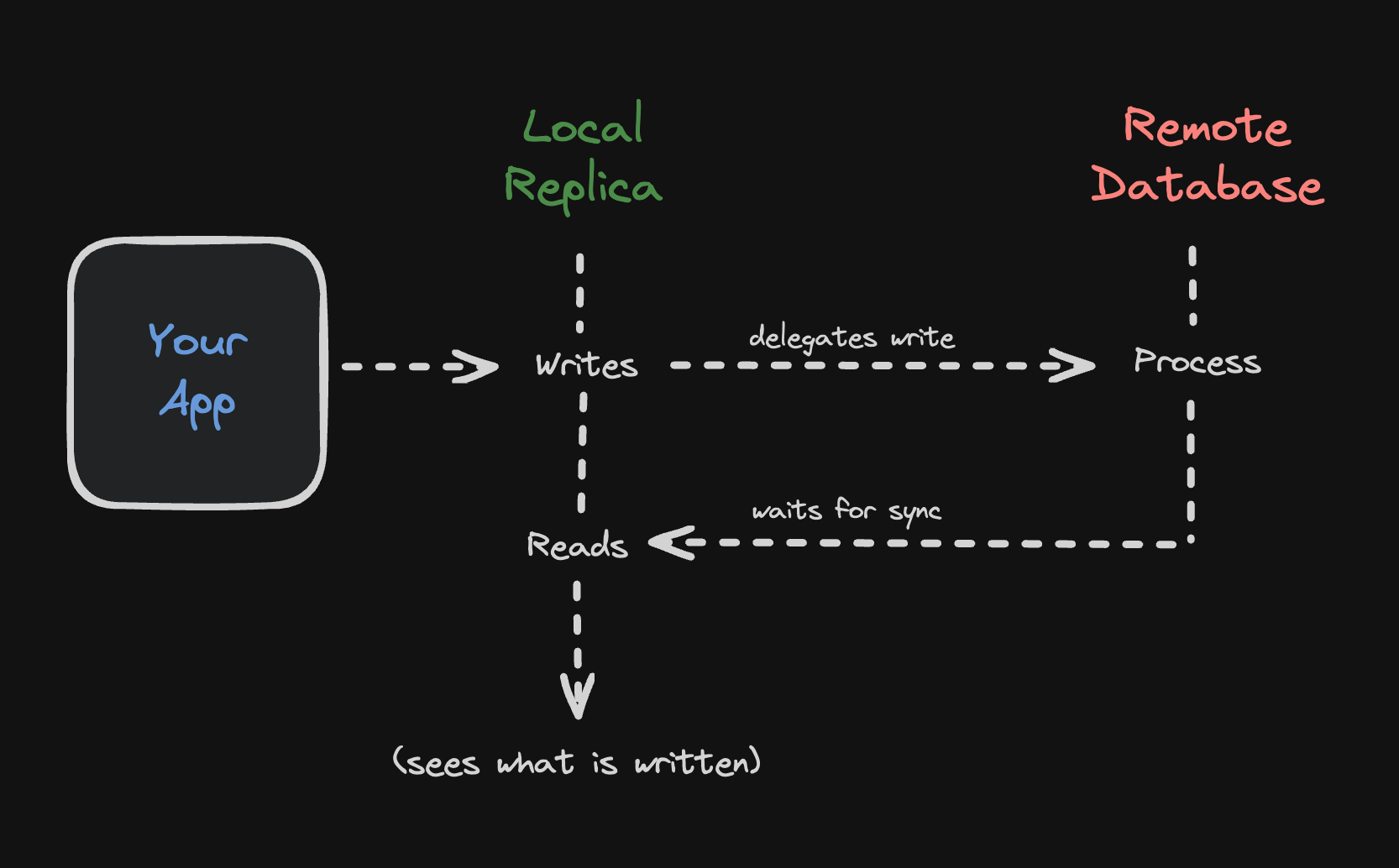
Embedded replicas provide a smooth switch between local and remote database operations, allowing the same database to adapt to various scenarios effortlessly. They also ensure speedy data access by syncing local copies with the remote database, enabling microsecond-level read operations — a significant advantage for scenarios demanding quick data retrieval.
-
You configure a local file to be your main database.
- The
urlparameter in the client configuration.
- The
-
You configure a remote database to sync with.
- The
syncUrlparameter in the client configuration.
- The
-
You read from a database:
- Reads are always served from the local replica configured at
url.
- Reads are always served from the local replica configured at
-
You write to a database:
- Writes are sent to the remote primary database configured at
syncUrlby default. - You can write locally if you set the
offlineconfig option totrue. - Any write transactions with reads are also sent to the remote primary database.
- Once the write is successful, the local database is updated with the changes automatically (read your own writes — can be disabled).
- Writes are sent to the remote primary database configured at
You can automatically sync data to your embedded replica using the periodic sync
interval property. Simply pass the syncInterval parameter when instantiating
the client:
import { createClient } from "@libsql/client";
const client = createClient({
url: "file:path/to/db-file.db",
authToken: "...",
syncUrl: "...",
syncInterval: 60,
offline: true, // Optional: Enable offline mode (default: false)
});
Embedded Replicas also will guarantee read-your-writes semantics. What that
means in practice is that after a write returns successfully, the replica that
initiated the write will always be able to see the new data right away, even if
it never calls sync().
Other replicas will see the new data when they call sync(), or at the next
sync period, if Periodic Sync is used.
Embedded Replicas support encryption at rest with one of the libSQL client SDKs.
Simply pass the encryptionKey parameter when instantiating the client:
The encryption key used should be generated and managed by you.
To use embedded replicas, you need to create a client with a syncUrl
parameter. This parameter specifies the URL of the remote Turso database that
the client will sync with:
const client = createClient({ url: "file:replica.db", syncUrl: "libsql://...", authToken: "...", });
```go Go theme={null}
package main

import (
   "database/sql"
   "fmt"
   "os"
   "path/filepath"

   "github.com/tursodatabase/go-libsql"
)

func main() {
   dbName := "local.db"
   primaryUrl := "libsql://[DATABASE].turso.io"
   authToken := "..."

   dir, err := os.MkdirTemp("", "libsql-*")
   if err != nil {
      fmt.Println("Error creating temporary directory:", err)
      os.Exit(1)
   }
   defer os.RemoveAll(dir)

   dbPath := filepath.Join(dir, dbName)

   connector, err := libsql.NewEmbeddedReplicaConnector(dbPath, primaryUrl,
      libsql.WithAuthToken(authToken),
   )
   if err != nil {
      fmt.Println("Error creating connector:", err)
      os.Exit(1)
   }
   defer connector.Close()

   db := sql.OpenDB(connector)
   defer db.Close()
}
use libsql::{Builder};

let build = Builder::new_remote_replica("file:replica.db", "libsql://...", "...")
   .build()
   .await?;
let client = build.connect()?;
use Libsql\Database;

$db = new Database(
    path: 'replica.db',
    url: getenv('TURSO_URL'),
    authToken: getenv('TURSO_AUTH_TOKEN'),
    syncInterval: 300 // Sync every 5 minutes
);
$conn = $db->connect();
// config/database.php
return [
    "default" => env("DB_CONNECTION", "libsql"),

    "connections" => [
        "libsql" => [
            "driver" => "libsql",
            "database" => database_path("database.db"),
            "url" => env("TURSO_DATABASE_URL"),
            "password" => env("TURSO_AUTH_TOKEN"),
            "sync_interval" => env("TURSO_SYNC_INTERVAL", 300),
        ],
        // ...
    ],
];

// .env
DB_CONNECTION=libsql
TURSO_DATABASE_URL=libsql://...
TURSO_AUTH_TOKEN=...
TURSO_SYNC_INTERVAL=300
You can sync changes from the remote database to the local replica manually:
```ts TypeScript theme={null} await client.sync(); ```if err := connector.Sync(); err != nil { fmt.Println("Error syncing database:", err) }
client.sync().await?;
$db->sync();
You should call `.sync()` in the background whenever your application wants to sync the remote and local embedded replica. For example, you can call it every 5 minutes or every time the application starts.
- Do not open the local database while the embedded replica is syncing. This can lead to data corruption.
- In certain contexts, such as serverless environments without a filesystem, you can't use embedded replicas.
- There are a couple scenarios where you may sync more frames than you might
expect.
- A write that causes the internal btree to split at any node would cause many new frames to be written to the replication log.
- A server restart that left the on-disk wal in dirty state would regenerate the replication log and sync additional frames.
- Removing/invalidating the local files on disk could cause the embedded replica to re-sync from scratch.
- One frame equals 4kB of data (one on disk page frame), so if you write a 1 byte row, it will always show up as a 4kB write since that is the unit in which libsql writes with.