

Introducing VT: the official command line tool to edit, manage, and begin val town projects right from your computer!
Val town gives you a super fast, light, simple, and intuitive way to instantly create websites. But until now, this entire experience has been on a polished web platform. There's a lot of reasons to want to work on your Val Town projects locally. Maybe you want to work from the comfort of your favorite editor, whether that's vscode, with your favorite extensions, theme, and keybinds, or Neovim. Or you want to access powerful local devtools, which are increasingly AI powered ones like Claude Code or AI powered IDEs. Maybe you want to use git, or some other version control system out side of Val Town. Or maybe you just want to keep a back up of a Val Town project, or work offline. Now you can!
There's a lot of different paths we could take to engineer a local val town development experience.
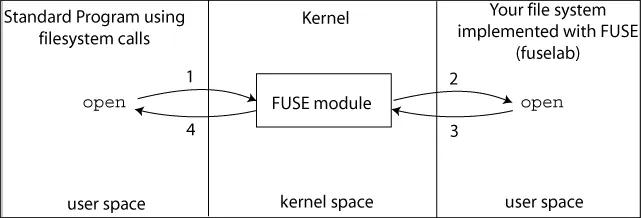
Originally, this project took the form of a fuse file system. Fuse is a Linux protocol that lets you implement arbitrary file systems in userspace. By implementing a fuse val town file system, all edits locally are instantly reflected on the val town website, and vice versa (if you update remotely, then if you try to save locally your editor will say something along the lines of "more recent edits found, are you sure you want to write"). Fuse is very powerful -- writes, reads, and all other file system syscalls can be handled with whatever response you want.
This project was vtfs, a project with the goal of exposing val town functionality through a file system. Originally it was a side project of mine, because "can I write the code in neovim" was the first question I asked myself when I first saw Val Town. I love the elegance of a file being a website, and thought it would be fun to be able to do a "touch website.ts" to create them, via the magic of fuse, and val town!
And so I built it! valfs was really cool: you'd run vt mount [dir] and you'd get a folder with all of your vals in it.
Vt was built written in golang with go-fuse, because, I didn't want to deal with C++ package management, and I wanted to try go.

Unfortunately vtfs no longer works anymore and because of breaking API changes, and, while there was work in progress on vtfs to add support for val town projects, development has paused on the project in favor of vt.
We decided to rewrite it, mostly for compatability reasons. Linux offers native fuse support, but MacOS and Windows definitely do not. For Mac, there's a project called MacFuse that acts as a kernel extension to provide fuse support to Mac. However, it's not totally stable, and Apple is deprecating kernel extensions and it may not be the best long term solution. There's a really cool project called fuse-t that takes a different approach, where it implements the fuse protocol by forwarding fuse to NFS (network file system), a protocol that Macs do natively support.
Even though it's a total rewrite, though, many design choices for vt came from vtfs.
vt is heavily inspired by both git and gh, the github CLI. There's elements like vt push and pull that are very gitty, and things like vt create that act like gh repo create.
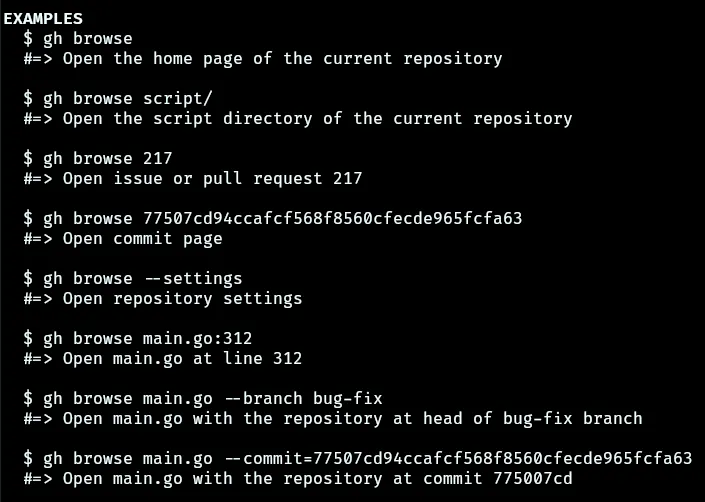
One handy vt command that we added is vt browse. vt browse opens up the current project in a web browser. As we work on improving hybrid workflows with the CLI and website, we will probably turn to gh to extend vt browse's functionality.
Unlike git, where you have a stage and commits, vt only has a notion of pushing and pulling. This means that the local state could conflict in ways with the remote state that could result in changes that we can't reconsile: like, if you pull and you have newer changes locally, or If you push and there are newer changes in the remote.
We spent a while considering what pushing and pulling meant. The conclusion we came to:
pushingis a forceful procedure. When you push we ensure that the remote state matches the local state, and by the end of the push the remote state should match the local state with no changes to the local state. This might sound scary, but we do versioning for projects, so in the worst case you could revert to an earlier version on the website and pull.pullingis a "graceful" procedure. When you pull, you may receive modifications, deletions, creations, or renames to local files. For all of these changes except creations, pulling warns the user that local changes will be lost, and you need to confirm to complete the pull. This is implemented internally by doing a "dry" pull and checking what changes would be made locally.
This means that the contract for push is "push the local state to make sure the remote matches it" and pull is "get the remote state and make sure the local state matches it."
Something we get for free is status. git status looks at changes since the previous commit, but vt status is identical to vt push --dry-run, and shows you all the changes that would get pushed.
As it turns out, many of the internal vt operations are able to easily piggyback off of one another. Like vt push --dry-run being the same as vt status, vt pull just does a vt clone, and then removes stuff that does not exist on the remote that still exists locally, or vt checkout is somewhat like vt pull-ing the branch you are trying to check out. These abstractions make testing and maintenance much easier.
One idea that we had to solve this problem of "the meaning of push and pull" was to totally scrap both, and change the contract to "sync to a consistent state." As it turns out, syncing really just redirects all the complexity, and is still quite complicated to implement.
I spent a while designing an algorithm for syncing, where the primary "building block" of the algorithm was to "walk" through revisions and make changes to the local state incrementally. Syncing would start by pulling to incorporate all remote changes locally, and then push the remainder. It also would look at modification times to try to guess which update should be kept in the case of local/remote conflicts.
Procedure Sync:
  1. Pull Updates from Remote
     - While current_version < latest_version:
       - Fetch the delta for current_version --> current_version + 1
	       from the remote.
       - Apply the delta:
         - New File:
           - If the file does not exist locally:
               - Create it.
           - Else:
               - Keep the newer one (compare btime or maybe mtime?).
         - Deleted File:
           - If the local mtime <= than the remote delete time:
               - Delete it locally.
           - Else:
               - Do nothing, keep the local file. We'll push it back later.
         - Modified File:
           - If modified locally:
               - Keep the newer modification.
           - Else:
               - Update the local file with the remote version.
       - Increment current_version.

  2. Push Local Changes
     - For each file in the local vt directory:
       - If file.mtime > remote_file.updatedAt:
         - Upload the file.
       - If the file exists locally but not on the server:
         - Upload it.

  3. Cleanup Remote Server, Fix Local State
     - For each file in the recursive vt server listing:
       - If it does not exist locally, delete it from the remote.
       - Update the local file's mtime to be the server's
     - Update version: current_version++ (should match remote_version++).
Working on vt, I came across a lot of really cool abstractions
One of the most important use cases of vt is "watch" functionality. From the beginning, my plan for this was to implement "git" behavior first (pushing and pulling), and then just doing file system watching to add live syncing using Deno.watchFs to handle file system events.
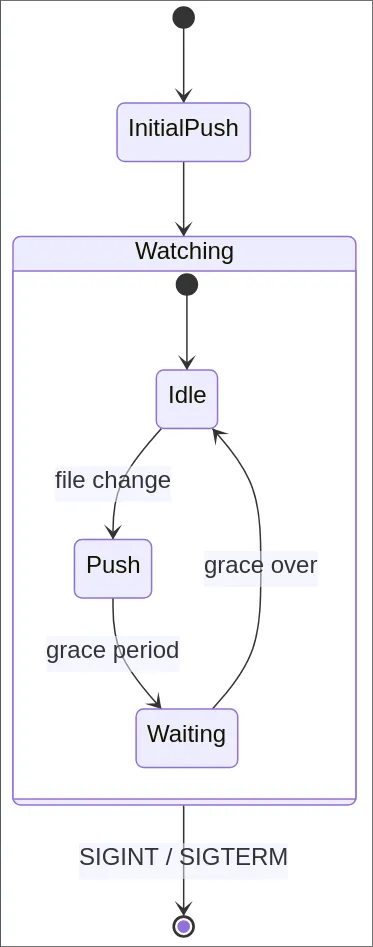
One particularly annoying challenge with vt watch was handling debouncing. Deno's standard library has an async module that was super useful for implementing vt watch. vt watch works by doing a push initially, and then whenever local changes are made running another vt push. It sounds super simple!
The issue is that there's a lot of different things that could trigger a "files were changed" notification, and doing the push itself is one of them (the .vt folder has files internally that get updated on a push). Instead of working out the corner cases, I added a grace for post-pushing before we are able to detect file changes again.
I also debounce the push. Initially, I did this so that if you are doing large amounts of file modifications we wait until you're done before starting the push, but it turns out this is more important because of how editors will create ephemeral temporary files during writes. Now, when you edit a file, the editor might create transient files, but as long as it gets rid of them within the debounce the final state that gets pushed is the one that does not include those temporary files.
One of the initial concerns was how one could edit val metadata locally, if we are limited to the context of files.

vtfs's approach to this was to pack all of the metadata for a val into the file corresponding to it. For Val Town projects, it's a bit more complex, because there's metadata specific to vals in the project, and metadata for the entire project itself too. We decided that, in general, changing val metadata and other uniquely val town attributes is something that we would leave to the website.
vtfs would indicate the type of a given val locally as foobar.H.tsx (or, if verbose, foobar.http.tsx), which was a really nice pattern. If you wanted to change the type of a val, you could just rename it to foobar.script.tsx. This pattern, however, turns out not to work as well for projects because vals in projects generally are suffixed with .tsx, so you would end up with foobar.http.tsx.tsx, and it would get messy quickly -- and there were some issues with Vscode not liking .script.tsx.
Instead of doing strict enforcement -- maintaining a 1:1 mapping of file extension to val type -- vt intuits the val type only on creation. If you create a foobar.tsx, vt sees .tsx and assumes it's a script. If you create foobar_http.tsx or foobar.http.tsx, vt sees .tsx, knows it's a val and not a file, and then guesses it's an http val. But it never will change it after the fact, so you can change foobar.http.tsx to be a script val on the website, and that's what it will continue to be going forward.
It might seem simple at first, but if you think about it, detecting whether a file was renamed is actually really tricky. If we move foo.ts to bar.ts how do we know that it wasn't a CREATE bar.ts and DELETE foo.ts? Originally we didn't plan on adding rename detection support to vt because of all the complexity that comes with rename detection.
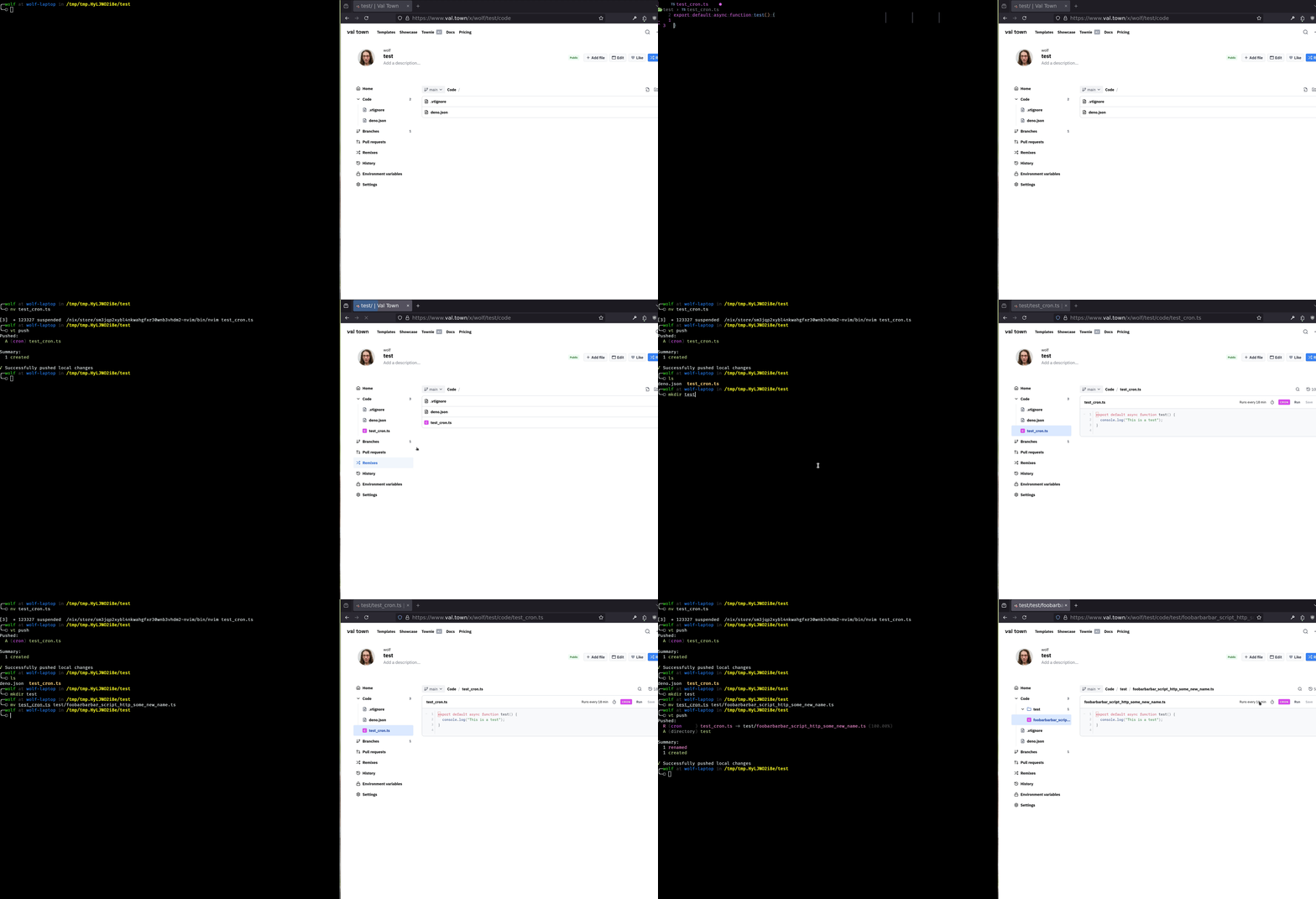
But then we realized that, without rename detection, if you move a val with configuration -- like cron config, or custom endpoint HTTP vals, then doing the deletion/creation would cause you to lose all your config! And so, we added rename detection to vt.
The rename detection algorithm is a bit complicated -- it works by looking at all files that got deleted and that got created, and then considering a file as renamed if a created file is sufficiently similar to a file that got deleted. When iterating over created files to see if a deleted file is similar enough to one of them, we use some heuristics to filter out files that could not possibly be similar enough, like the file length. Then we compute the Levenshtein distance between a given deleted file and created file, and consider a given created file "renamed" if it is above some theshold similar to a deleted file, and if it is similar enough to multiple, then the one it is most similar to as it turns out, Deno's standard library has a super efficient edit distance function. Git does fancy directory rename detection, which is something that, at least for now, vt does not do.
Because rename detection is relatively expensive, it is internally implemented as an optional operation that doesn't always get used for every vt operation. For example, there isn't a lot of reason to do rename detection for vt pull -- it would really just be for reporting.
For vtfs, something I wanted to add early on was a way to "mount" your val town blob store so that you could view, edit, and organize your blobs. With fuse, there's a ton of flexibility on how to implement inodes. go-fuse provides a lot of nice abstractions. For totally static files like deno.json I was using the MemRegularFile helper, which makes it trivial to create an Inode with static text contents. For Vals, I was doing it more manually, implementing the read and write methods for a custom ValFile Inode myself. But for blobs, I wanted to handle reads and writes by streaming the relavent portions of the file.
When implementing my own write callback for fuse, I would be handling requests to write data to a region of a file (like, write 0001010101 starting at index 22 bytes). Our /v1/blob endpoint is somewhat restrictive here. You can only write an entire file, or get an entire file. Handling this was really tricky -- I could start a new upload to upload the entire state of the file, with the new change made in the current write call, but if you're writing a lot of data to a file (like if you cp bigFile.png to the folder that I was using to represent your val town blobs), then there would typically be a burst of write requests to write to consecutive regions of the file.
I spent a long time working on setting up a pipe where I would handle consecutive writes, writes that start at index i, end at index i+k, and then a new write that starts at index i+k+1, etc, as a special case. Eventually, I got something working!
For vtfs I was using Openapi Generator, and it turned out that Val Town's OpenAPI specification didn't accept file sizes on the order of my tests -- where the response would include the file size, it was an integer, not a format: int64 (long).

Maintaining this, and getting writes to work non consecutively continued to prove a huge challenge. valfs blob read/write support was a fun challenge to work on, but was never totally reliable.