
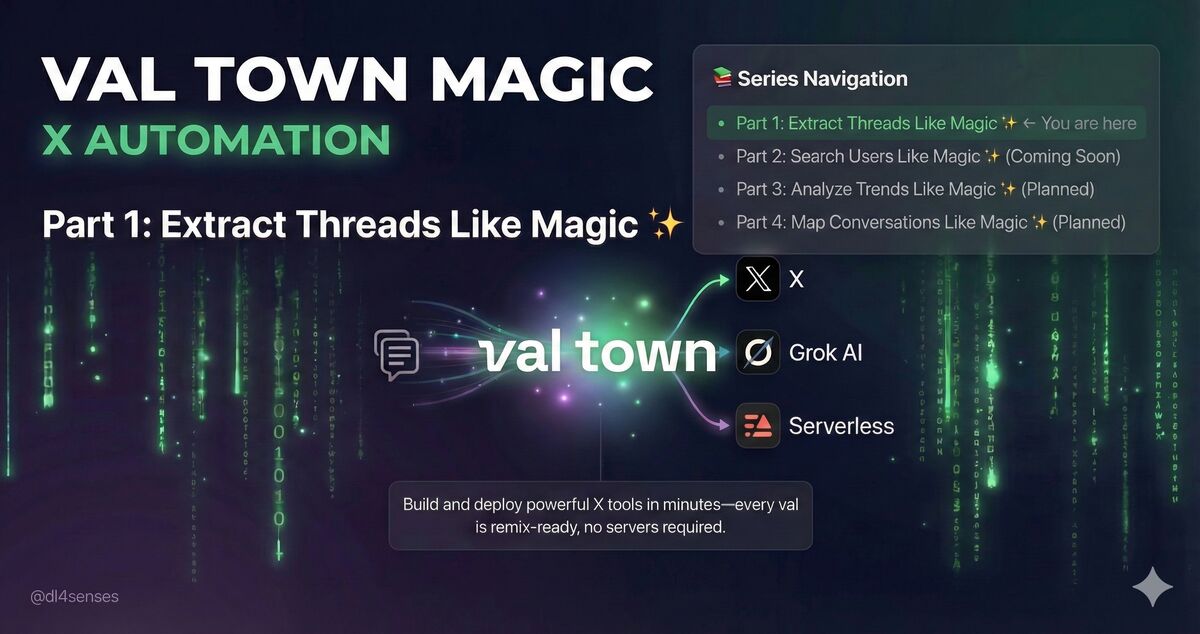
Build and deploy powerful X tools in minutes—every val is remix-ready, no servers required
Series Introduction: Welcome to Val Town Magic - where building production-ready X automation takes minutes, not hours. This series shows you how Val Town's serverless platform and Grok's AI combine to create powerful tools. Every val is remix-ready—fork it, customize it, deploy instantly. No servers, no setup, just magic.
- Part 1: Extract Threads Like Magic ✨ ← You are here
- Part 2: Search Users Like Magic ✨ (Coming Soon)
- Part 3: Analyze Trends Like Magic ✨ (Planned)
- Part 4: Map Conversations Like Magic ✨ (Planned)
You've found the perfect X thread. Maybe it's a brilliant AI researcher breaking down a complex paper across 50 tweets. Or a startup founder sharing hard-won lessons. Or a hilarious story that deserves to be saved forever.
But here's the problem: Reading threads on X is painful. Ads interrupt your flow. Notifications steal your focus. The algorithm shows you "related" tweets you don't care about. And if you want to save the thread? Good luck copy-pasting 47 tweets while preserving all the images and videos.
That's why I built X Thread Extractor on Val Town.
Paste any thread URL, get the entire thing—text, images, videos, GIFs—beautifully formatted in seconds. And here's the magic: One click to remix this val and deploy your own instance. No servers to configure, no APIs to manage, no deployment headaches. Just instant, working automation powered by Val Town and Grok.
Before you start: The Grok API can take 30-120 seconds to extract threads, especially for longer threads or complex searches. Here's what you need to know:
- Typical extraction time: 30-60 seconds for most threads
- Long threads: Can take up to 2 minutes (current timeout limit)
- Timeout errors: If extraction takes longer than 120 seconds, the request will timeout
- What to do if it times out:
- Option 1: Try again - sometimes API performance varies
- Option 2: Increase the timeout in
main.ts:70by changingsetTimeout(() => controller.abort(), 120000)to a higher value (e.g.,180000for 3 minutes) - Option 3: Try extracting during off-peak hours when API response times are faster
Why does it take so long? The Grok API uses reasoning models to intelligently search and extract threads from X. This involves:
- Searching X's database with the optimized query
- Following the thread structure and pagination
- Extracting all media URLs and metadata
- Structuring the response as clean JSON
Pro tip: Watch the debug panel (yellow box) to see real-time status updates while extraction is in progress.
If you've tried other thread readers, you know the pain:
Traditional thread readers break constantly. When tweets get deleted, the whole thread falls apart. When accounts go private, you lose access. When the service shuts down (RIP so many thread readers), your saved threads disappear.
X's own thread view isn't much better. You can't save threads offline. You can't share them with people who don't use X. You can't search through archived threads. And downloading a thread manually? That's 30 minutes of your life you're never getting back.
API access is complex and expensive. X's API has strict rate limits, requires OAuth authentication, and costs money at scale. Building your own thread extractor means wrestling with pagination, handling deleted tweets, and dealing with media URLs that expire.
There had to be a better way.
X Thread Extractor turns any thread URL into a complete, self-contained archive in under a minute.
Here's what makes it different:
No scraping, no breaking. Instead of brittle web scraping, it uses xAI's Grok API with the x_search tool. Grok intelligently searches X and extracts threads using the same backend that powers Grok's thread reading on X itself. If Grok can see it, you can extract it.
Everything preserved. Images, videos, GIFs, tweet text, timestamps, usernames—all captured in clean JSON. Media URLs come straight from X's CDN, properly formatted and ready to display.
Works instantly. No signup required. No API keys needed (unless you deploy your own). Just paste a URL and watch it work.
Free and open. The entire codebase is yours to fork, modify, and deploy on Val Town. Privacy-conscious? Run your own instance. Want to customize the output? The code is clean and well-documented.
Under the hood, it's surprisingly elegant.
When you paste a thread URL like https://x.com/elonmusk/status/1234567890, here's what happens:
1. Smart URL validation
The system normalizes your URL (works with both x.com and twitter.com) and extracts the username and tweet ID. No matter how messy your URL—tracking parameters, mobile links, URL shorteners—it figures it out.
2. Intelligent query construction
This is where it gets clever. Instead of naively requesting "all tweets from this user," it builds an optimized search query:
{tweetId} from:{username} (conversation_id:{tweetId} OR filter:self_thread)
This query tells Grok: "Find this specific tweet, plus all replies from the same author that are part of this conversation thread." It's the same query pattern X uses internally, which means you get complete threads, even complex ones with gaps.
3. Grok does the heavy lifting
The query goes to xAI's Grok API with the x_search tool enabled. Grok doesn't just search—it reasons about the results. It follows the thread structure, finds all the author's replies, handles pagination automatically, and returns a structured response.
The model used is grok-4-1-fast-reasoning, optimized for speed without sacrificing accuracy. Most threads extract in 30-60 seconds.
4. Bulletproof parsing
Grok returns JSON, but sometimes it's not perfect. Maybe there's a newline in a tweet that breaks the JSON structure. Maybe the response gets truncated.
The extractor handles this gracefully:
- Strips markdown code blocks if Grok wraps the response
- Attempts to fix malformed JSON automatically
- Logs detailed error messages if something goes wrong
- Validates the final structure against a strict Zod schema
5. Beautiful presentation
The extracted thread appears in a dark-themed UI that's actually pleasant to read. Each tweet gets its own card with:
- Numbered badges showing position in the thread
- Username and timestamp
- Full tweet text with preserved formatting
- Embedded media in a responsive grid
- Direct link back to the original tweet
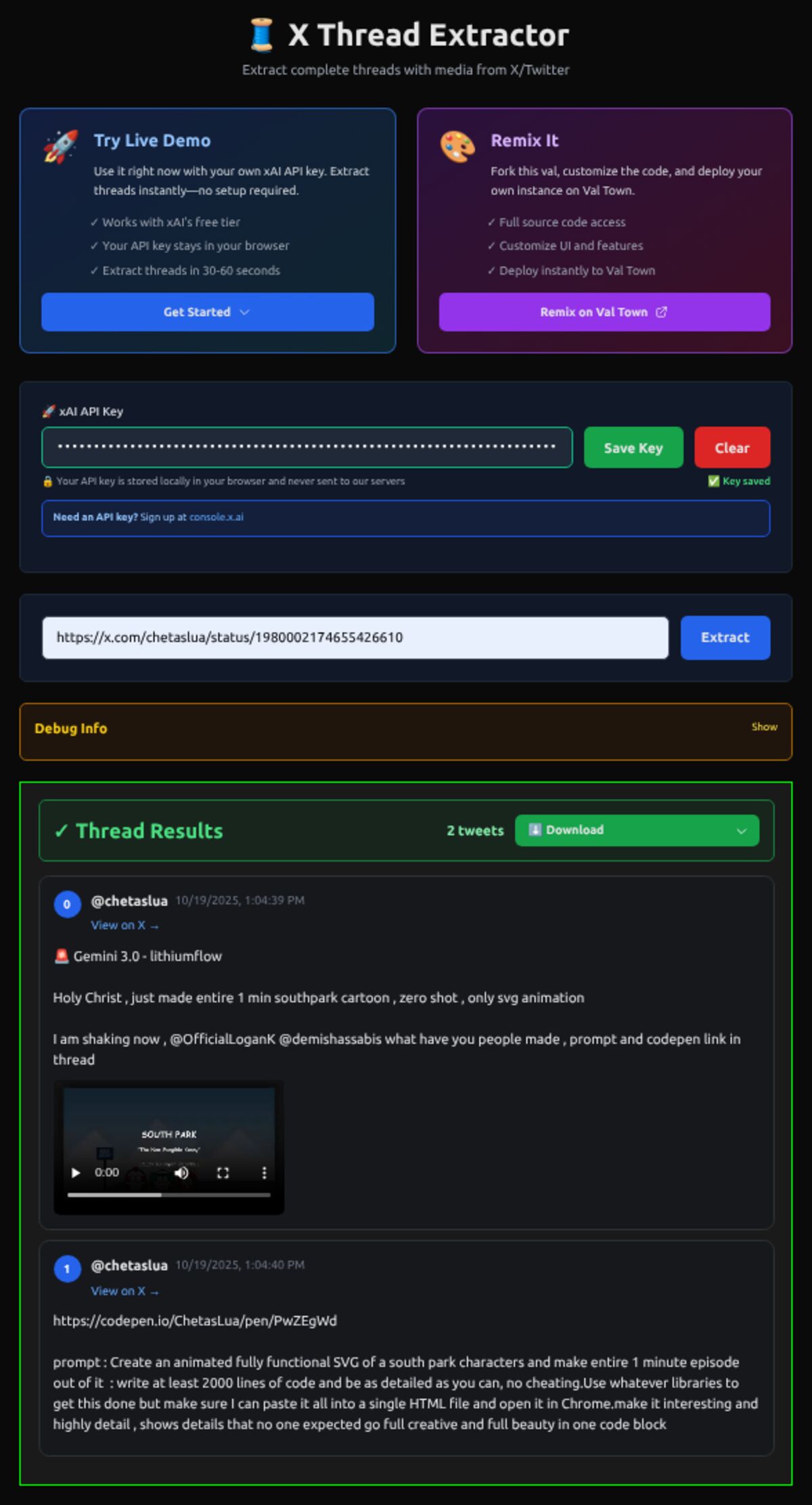
Let's walk through a real example. Say you want to save this thread about Gemini 3.0's new animation capabilities from @chetaslua:
https://x.com/chetaslua/status/1980002174655426610
Step 1: Open the web interface (we'll cover deployment in a minute)
Step 2: Paste the URL and click "Extract"
You'll see an animated spinner with real-time status updates: "Fetching thread with Grok AI..."
Step 3: Wait 30-120 seconds (be patient!)
The Grok API reasoning process takes time. Watch the debug panel for status updates. If it times out after 2 minutes, simply try again or adjust the timeout in the code.
Step 4: You get clean JSON output:
[
  {
    "index": 1,
    "tweet_id": "1980002174655426610",
    "username": "chetaslua",
    "timestamp": "2025-10-19T20:04:39Z",
    "text": "🚨 Gemini 3.0 - lithiumflow\n\nHoly Christ, just made entire 1 min southpark cartoon...",
    "videos": ["https://video.twimg.com/amplify_video/...mp4"]
  },
  {
    "index": 2,
    "tweet_id": "1980002177952231822",
    "username": "chetaslua",
    "timestamp": "2025-10-19T20:04:40Z",
    "text": "https://codepen.io/ChetasLua/pen/PwZEgWd\n\nprompt: Create an animated fully functional SVG...",
    "images": []
  }
]
The UI renders it beautifully—video preview, clickable links, perfect formatting. You can copy the JSON for your records or just read it in the UI.
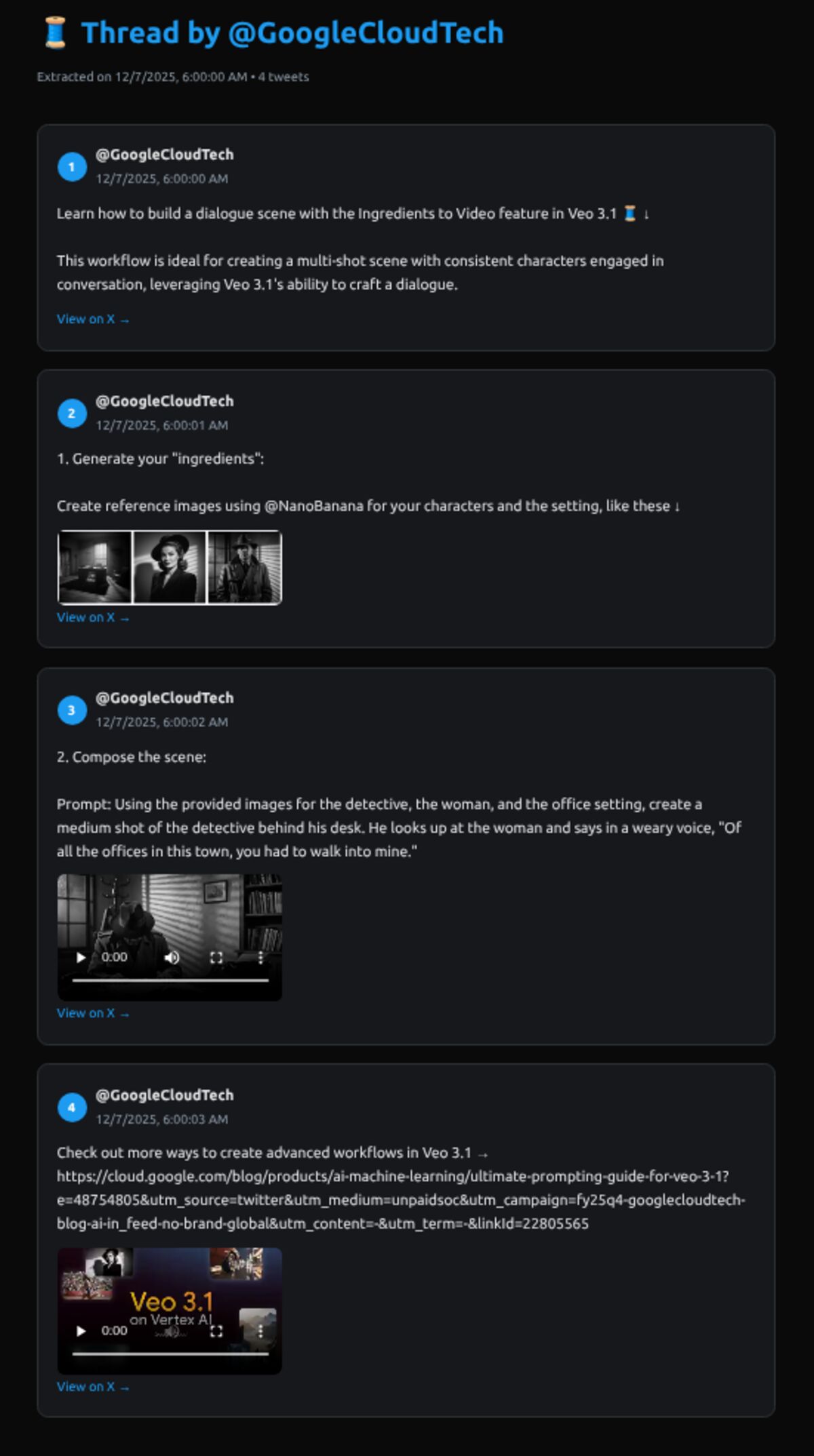
🎨 Dark theme that doesn't hurt
Inspired by X's own dark mode, the color scheme is optimized for extended reading. Your eyes will thank you.
🐛 Debug panel when you need it
See exactly what's happening behind the scenes. The yellow debug panel shows:
- Real-time status updates (Idle → Fetching → Success/Error)
- HTTP response codes
- The raw JSON response for troubleshooting
- Any error messages with stack traces
It auto-collapses when results are ready, but you can toggle it anytime with "Show/Hide."
🖼️ Media preview that actually works
Images display in a responsive grid. Videos are embedded with controls. GIFs play automatically. No broken links, no missing content.
⚡ Extraction time: 30-120 seconds
Most threads extract in 30-60 seconds, but longer threads can take up to 2 minutes. The progress indicator and debug panel show you exactly what's happening, so you're never left wondering. If it times out, simply resubmit or increase the timeout limit in the code (see Common Questions section).
📱 Works everywhere
Responsive design means it works on your phone, tablet, or desktop. The layout adapts intelligently to your screen size.
🎯 Auto-scroll to results
When extraction completes, the page automatically scrolls to show your results. No hunting for output.
The fastest way to try it with your own API key:
-
Get your xAI API key (free credits included):
- Visit console.x.ai
- Create an account (sign up is free)
- Generate an API key
-
Visit the live demo:
https://cnndabbler-grok_thread.web.val.run/ -
Enter your API key:
- Paste your xAI API key in the "🚀 xAI API Key" field
- Your key is stored locally in your browser (never on our servers)
-
Extract threads:
- Paste any X thread URL (e.g.,
https://x.com/elonmusk/status/1234567890) - Click "Extract"
- Watch the magic happen with Grok AI!
- Paste any X thread URL (e.g.,
Privacy & Security:
- 🔒 Your API key stays in your browser only
- 🔐 No server-side storage of API keys
- 🚀 Your extraction requests go directly to xAI
Why deploy your own?
- Privacy: Your extracted threads never touch anyone else's server
- Customization: Modify the UI, add features, integrate with your tools
- Learning: See exactly how modern agentic AI systems work
- Control: No rate limits except your own Grok API quota
Prerequisites:
- A Val Town account (free tier works great)
- An xAI API key from docs.x.ai
Step-by-step deployment:
- Fork the val on Val Town
- Go to Val Town and search for
@dl4senses/grok_thread - Click "Fork" to create your own copy
- Or clone this repository and create a new val
- Go to Val Town and search for
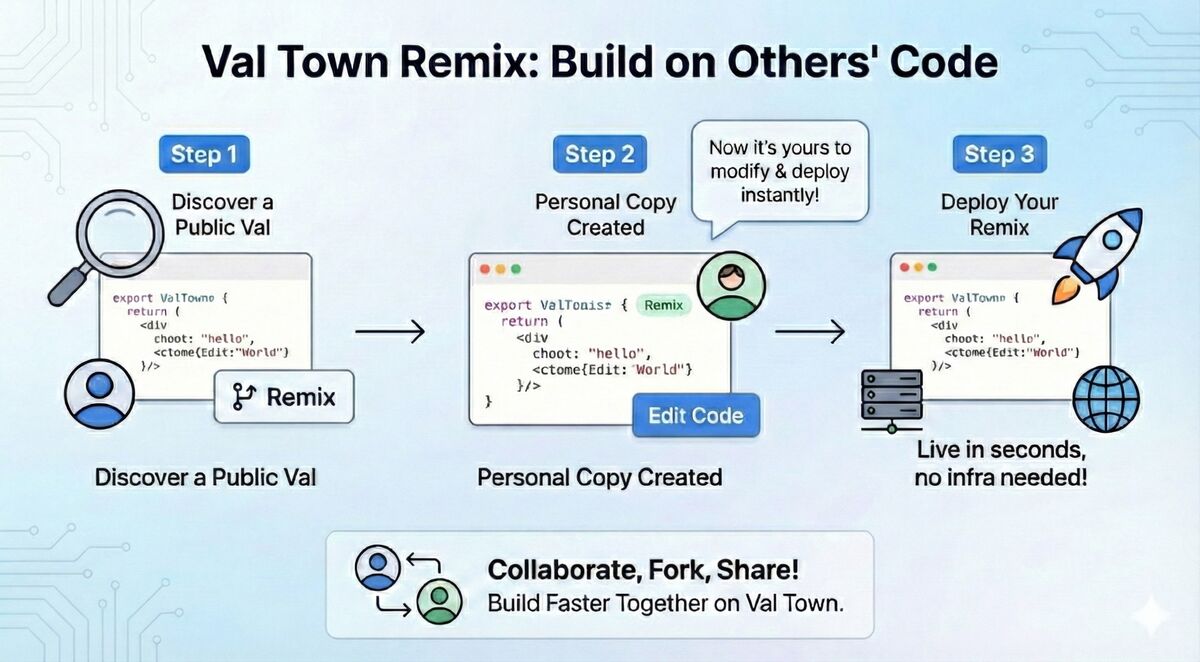
That's Val Town magic! Your forked val is instantly live at https://[your-username]-grok_thread.web.val.run/. No build step, no deployment pipeline, just instant serverless hosting.
-
Deploy and test
- Your forked val is now ready! No environment variables needed
- Visit your deployed val URL
- Enter your xAI API key in the UI (stored locally in browser)
-
Deploy with vt watch (for local development)
# Clone the repository
cd your-workspace
git clone [your-repo]

# Navigate to the val
cd individual_vals/grok_thread

# Start live development
vt watch
Changes you make locally will auto-deploy to Val Town. See logs in real-time.
-
Test it out
- Your val is now live at:
https://[your-username]-xthreadwithmedia.web.val.run/ - Try extracting a thread
- Check the browser console (F12) for debug logs
- Monitor the terminal for server-side logs with
[SERVER]and[PARSE]prefixes
- Your val is now live at:
Troubleshooting deployment:
"I see a 500 error" → Make sure you entered a valid xAI API key in the input field (starts with "xai-")
"Results don't show up" → Open browser console, look for the debug panel, scroll down—results appear below the form
"JSON parsing error" → The val auto-retries with JSON cleanup; check terminal logs for [PARSE] messages
The scenario: You're writing a research paper and found a detailed explanation of a concept in a 30-tweet thread from a domain expert.
The solution: Extract the thread, get clean JSON with all tweet IDs and timestamps. Now you can:
- Quote specific tweets with proper citations
- Archive the thread in case it's deleted later
- Include screenshots of key tweets with preserved media
- Link back to the original thread for verification
The result: Your citations are accurate, verifiable, and won't break if the thread disappears.
The scenario: You're a blogger covering AI developments. A viral thread just dropped analyzing a new model's capabilities, complete with test results and videos.
The solution: Extract the thread immediately. The structured JSON makes it easy to:
- Pull out key quotes for your article
- Embed media directly in your blog post
- Create a summary without manually copy-pasting
- Maintain attribution with direct links to each tweet
The result: You publish faster with better formatting and perfect attribution.
The scenario: You use Obsidian/Notion/Roam for personal notes and frequently save valuable threads.
The solution: Extract threads as JSON, then:
- Parse the JSON into Markdown notes automatically
- Preserve all media links for offline reference
- Tag and organize threads by topic
- Search through your thread archive later
The result: Your personal knowledge base becomes a searchable archive of the best threads you've found.
If you're wondering how this actually works at a deeper level:
Built on Val Town
Val Town is a serverless TypeScript platform that makes deployment ridiculously easy. Write TypeScript, deploy instantly, no config files or Docker containers. This val is a single 500-line file that handles everything from HTTP routing to AI calls.
Powered by Grok's Agentic Search
This isn't web scraping. Grok's x_search tool is an agentic search system trained specifically for X. It understands thread structures, handles pagination, and returns structured data. It's the same technology that powers Grok's ability to read and understand threads when you ask it questions on X.
Type-Safe with Zod
Every tweet extracted must match this schema:
const TweetSchema = z.object({
  index: z.number(),           // Position in thread (1-based)
  tweet_id: z.string(),        // Unique tweet ID
  username: z.string(),        // Author username (no @)
  timestamp: z.string(),       // ISO 8601 format
  text: z.string(),            // Tweet text content
  images: z.array(z.string()), // Image URLs
  videos: z.array(z.string()), // Video URLs
  gifs: z.array(z.string()),   // GIF URLs
});
If Grok returns something that doesn't match, Zod catches it immediately. No corrupted data makes it through.
Robust Error Handling
Things that could go wrong:
- Grok returns malformed JSON → Auto-retry with cleanup
- Request times out → 120-second timeout prevents hanging
- Tweet is deleted → Clear error message
- API key is invalid → Immediate feedback
Every error case is handled gracefully with helpful messages.
Optimized for Cost
The val uses grok-4-1-fast-reasoning (instead of the standard Grok model) and sets max_tokens: 4096 to prevent truncation while keeping costs low. A typical thread extraction costs a few cents in API calls.
Want to integrate thread extraction into your own app?
curl "https://[your-username]-xthreadwithmedia.web.val.run/?url=https://x.com/user/status/123"
Returns clean JSON array of tweets. No authentication needed (on the free tier—add your own auth for production).
const extractThread = async (threadUrl: string) => {
  const response = await fetch(
    `https://[your-username]-xthreadwithmedia.web.val.run/?url=${encodeURIComponent(threadUrl)}`
  );

  if (!response.ok) {
    const error = await response.json();
    throw new Error(error.error);
  }

  return await response.json();
};

// Use it
const thread = await extractThread("https://x.com/sama/status/1234567890");
console.log(`Found ${thread.length} tweets`);
thread.forEach(tweet => {
  console.log(`${tweet.index}. ${tweet.text}`);
});
curl "https://[your-username]-xthreadwithmedia.web.val.run/test"
# Returns: {"ok": true, "time": "2025-12-07T12:00:00.000Z"}
Author-only threads
The extractor pulls tweets from the thread author only, not replies from other users. This keeps the output clean and focused, but means you won't get quote tweets or replies from others.
120-second timeout (most common issue)
This is important: Very long threads (200+ tweets) or slow API responses might time out after 2 minutes. The timeout prevents hanging requests, but it also means some threads won't extract on the first try.
Solutions:
- Quick fix: Just click "Extract" again - API performance varies and it often works on the second attempt
- Permanent fix: Edit
main.ts:70and change120000to a higher value like180000(3 min) or240000(4 min) - Alternative: Try during off-peak hours when Grok API response times are faster
Grok API rate limits
You're subject to xAI's rate limits on your API key. The free tier is generous, but if you're extracting hundreds of threads per day, you might hit limits.
Media URL expiration
Media URLs come directly from X's CDN. They're valid when extracted, but X may expire them eventually. For long-term archiving, download the media files separately.
"Why is extraction taking so long / timing out?"
This is the most common issue. Grok's reasoning model typically takes 30-60 seconds, but can take up to 2 minutes for complex threads. Here's a troubleshooting guide:
- Check the debug panel (yellow box): If status shows "Fetching from API," it's still working - be patient
- If it times out after 2 minutes:
- Try submitting the same URL again (API performance varies)
- Check if the thread is very long (100+ tweets) - these are more likely to timeout
- Consider increasing the timeout limit in
main.ts:70from120000(2 min) to180000(3 min) or240000(4 min)
- If it consistently times out:
- Try during off-peak hours (early morning US time often works better)
- Check if your API key has rate limits
- Try a shorter thread first to verify the system is working
"Why does the spinner seem stuck?"
This is normal! Grok's reasoning model can take 30-60 seconds for complex threads. Check the debug panel—if the status says "Fetching from API," it's working. If it's been more than 2 minutes, it will timeout automatically.
"I see 'Unterminated string in JSON' errors"
This happens when tweet text contains characters that break JSON parsing. The val automatically retries with JSON cleanup. If it still fails, check the terminal logs (if using vt watch) for [PARSE] messages.
"Results appear but look broken"
Try a hard refresh (Ctrl+Shift+R on Windows/Linux, Cmd+Shift+R on Mac) to clear your browser cache. If that doesn't work, check the browser console (F12) for JavaScript errors.
"Can I extract private/protected threads?"
No. The extractor uses Grok's search, which only accesses public tweets. If you can't see a thread without being logged in, the extractor can't access it either.
"How much does this cost to run?"
Using the deployed instance? Free (donation appreciated).
Running your own? Costs are just your Grok API usage:
- Each thread extraction: ~1,000-5,000 tokens
- Grok-4-1-fast-reasoning pricing: ~$0.50-2.00 per 1M tokens
- Rough cost: $0.001-0.01 per thread
Val Town free tier is sufficient for moderate usage.
This is just the beginning. Potential future features:
Batch processing – Drop a list of 50 thread URLs, get them all extracted in parallel
Export to Markdown/PDF – One-click export for offline reading or sharing
Integration with note-taking apps – Auto-save extracted threads to Obsidian, Notion, or Roam
Thread analytics – Track thread length, media usage, engagement patterns
Webhook support – Get notified when extraction completes for async workflows
Want to contribute? The codebase is clean, well-documented, and ready for extensions. Fork it, add features, and share what you build.
Try it:
Visit the live demo at https://[your-username]-xthreadwithmedia.web.val.run/ and extract your first thread in seconds.
Deploy your own: Fork on Val Town, add your xAI API key, and you're live in 2 minutes.
Integrate it: Use the simple API endpoint to add thread extraction to your own apps.
Questions? Check the Grok Search Tools docs or explore the xAI API documentation.
For developers who want the nitty-gritty details:
const TweetSchema = z.object({
  index: z.number(),           // Position in thread (1-based indexing)
  tweet_id: z.string(),        // X's unique tweet identifier
  username: z.string(),        // Author's username (without @ prefix)
  timestamp: z.string(),       // ISO 8601 timestamp
  text: z.string(),            // Full tweet text with preserved formatting
  images: z.array(z.string()), // Array of direct image URLs
  videos: z.array(z.string()), // Array of direct video URLs
  gifs: z.array(z.string()),   // Array of direct GIF URLs
});
grok_thread/
├── main.ts              # Complete implementation (532 lines)
├── main_golden.ts       # Backup version (stable)
├── main_golden_2.ts     # Secondary backup
├── deno.json            # Deno configuration
├── AGENTS.md            # Val Town agent guidelines
└── README.md            # This document
No environment variables required! The application is fully configured to accept API keys via the interactive UI, providing better security and user experience.
{
  "zod": "3",                    // Runtime schema validation
  "zod-to-json-schema": "3"      // Convert Zod → JSON Schema for Grok
}
| Endpoint | Method | Purpose | Response |
|---|---|---|---|
/ | GET | Web UI (no params) | HTML interface |
/?url=<thread_url> | GET | Extract thread | JSON array of tweets |
/test | GET | Health check | {ok: true, time: "..."} |
400– Invalid or missing URL parameter500– API error, parsing failure, or timeout200– Success with JSON payload
Server-side logs use prefixes for easy filtering:
[SERVER]– HTTP request handling and validation[PARSE]– JSON parsing and error recovery
When using vt watch, these logs appear in your terminal in real-time.
# Clone and navigate
cd individual_vals/grok_thread

# Start live development
vt watch

# Make changes in your editor
# They deploy automatically to Val Town

# Check logs in terminal
# Test at https://[username]-xthreadwithmedia.web.val.run/
December 2025 – Web UI Release
- Beautiful dark-themed web interface
- Comprehensive debug panel with real-time status
- Fixed JSON truncation with
max_tokens: 4096 - Robust JSON parsing with automatic error recovery
- Auto-scroll to results, responsive design
- Server-side logging with
[SERVER]and[PARSE]prefixes
Initial Release
- Core thread extraction functionality
- Grok API integration with
x_searchtool - Zod schema validation
- Basic error handling
This is Part 1 of Val Town Magic: X Automation. Here's what's coming:
🎯 Part 2: Search Users Like Magic ✨ (Coming Soon)
- Use natural language to find X users: "AI researchers working on agents"
- Target specific users, filter by date, analyze media types
- Get source citations for every result
- One-click remix to deploy your own user search tool
- Built with Grok's x_search user search capabilities (docs.x.ai)
📊 Part 3: Analyze Trends Like Magic ✨ (Planned)
- Discover what's trending in any topic or community
- AI-powered sentiment analysis and pattern detection
- Compare trends across time periods with date filtering
- Automated trend reports delivered via Val Town cron triggers
- Remix to monitor your own topics
💬 Part 4: Map Conversations Like Magic ✨ (Planned)
- Map multi-party conversations and reply chains
- Sentiment analysis across entire conversation threads
- Identify key influencers and engagement patterns
- Visualize conversation flow and topic evolution
- Remix to analyze any X conversation
Want to suggest a tool for the series? Open an issue or reach out - I'm always looking for new ways to make Val Town magic!
Note: All tools in this series are built on Val Town's serverless platform using xAI's Grok API. Every val is fully open source and remix-ready.
Built with ❤️ using Val Town and xAI's Grok.
Part of: Val Town Magic: X Automation by @dl4senses